
NEWS
Best Collaboration Tools for Remote Teams: How to Build Connection, Productivity, and Growth in a Distributed World
NEWS
Best Collaboration Tools for Remote Teams: How to Build Connection, Productivity, and Growth in a Distributed World

11.23.2025
Remote work is no longer an experiment — it is the default operating model for thousands of modern companies. Research shows that 68% of European and North American organizations have already adopted flexible distributed setups, while analysts predict that within the next few years over 75% of departments worldwide will include remote employees.
This shift creates new opportunities: access to global talent, cost efficiency, and the ability to scale teams fast. But it also raises a core challenge — how to keep remote teams connected, engaged, and productive without physical proximity.
After more than a decade helping companies build digital ecosystems, strengthen internal processes, and scale engineering teams through outsourcing and outstaffing, our team at Abyron sees the same pattern across industries:
Companies that invest in the right digital collaboration environment outperform competitors in speed, productivity, culture alignment, and innovation.
In this article, we’ll explore the best collaboration tools for remote teams, analyze their impact, compare before-and-after results, and explain how organizations can leverage our expertise to build a strong remote work infrastructure that actually works.
Why Digital Collaboration Tools Matter for Remote Teams
When teams work across time zones, communication stops being spontaneous — it becomes intentional. Without structure, distributed employees often feel isolated, misaligned, or even disconnected from the company mission.
This is why top-performing organizations rely on remote collaboration tools and secure online collaboration platforms to create a unified work environment.
But tools alone are not enough. Teams need the right configuration, onboarding, and workflows — and this is where expert support becomes critical. Abyron helps companies implement tool ecosystems tailored to their operations, integrate automation, and structure remote processes for scalable performance.
Let’s explore the solutions that help remote teams stay connected, organized, and high-performing — starting with a real case we developed at Abyron.
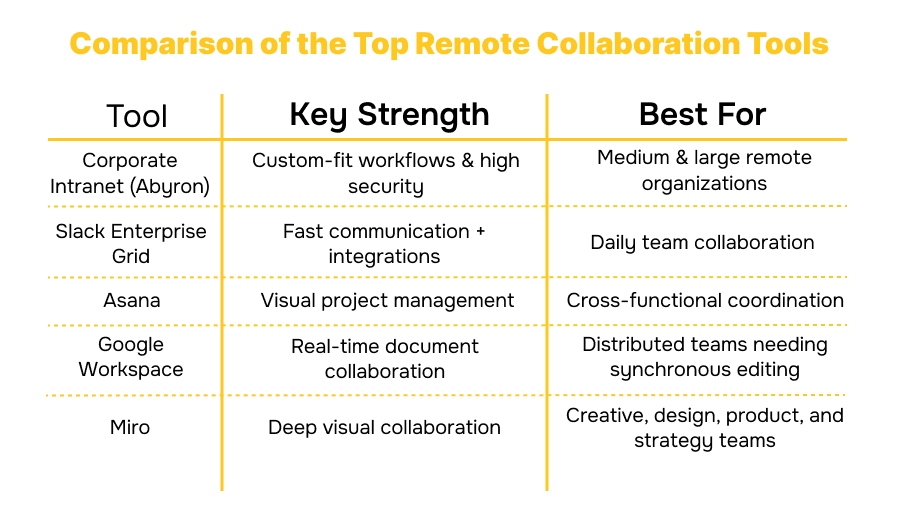
1. Custom Corporate Intranet by Abyron — A Unified Digital Workspace for Distributed Teams
Before choosing any ready-made tool, companies often face a deeper issue: their workflows simply don’t fit existing platforms. One of our clients came to us with exactly this challenge. Their distributed workforce needed a centralized digital space where employees could communicate, track tasks, exchange documents, and keep alignment across departments.
Generic software wasn’t flexible enough — so we developed a custom corporate intranet tailored to their real operational needs.
A secure digital workspace integrating:
- company-wide news feed to maintain alignment
- task creation, assignment, and tracking
- seamless Microsoft 365 document exchange
- an integrated partner-management module
- modernization of the codebase and removal of vulnerabilities improved stability of the entire system.
This wasn’t just another tool — it became a central hub for communication, collaboration, and knowledge flow.
After launch, the client saw:
- improved application stability
- optimized employee working hours
- reduced security risks
- strengthened team cohesion and faster decision-making
This example perfectly illustrates how custom-built digital environments can outperform off-the-shelf tools — especially for teams working remotely.
2. Slack Enterprise Grid — Secure Online Collaboration with Human Touch
Slack has become one of the leading internal communication tools used by remote teams. Its Enterprise Grid edition adds security, governance, and compliance — making it ideal for European companies with strict privacy standards.
What makes Slack powerful:
- channels for structured communication
- threads for clarity (great for asynchronous collaboration)
- voice messages & huddles for quick syncs
- thousands of integrations with tools like GitHub, Asana, and Notion
Teams love Slack because it blends work and connection — essential for keeping remote teams engaged. It also provides secure online collaboration tools, ensuring the safety of corporate communication.
3. Asana — Visual Project Management for Distributed Workflows
For many remote organizations, Asana becomes the core of virtual collaboration in the workplace. It transforms chaos into clarity through visual workflows, task ownership, deadlines, and real-time progress tracking.
Why remote teams choose Asana:
- clear visibility into priorities
- automation of repetitive tasks
- transparency across departments
- timeline and board views for different work styles
Switching from email-based task coordination to Asana often leads to a 45% increase in productivity, according to industry analysis.
4. Google Workspace — Real-Time Document Collaboration
Google Workspace remains one of the best cloud collaboration tools due to its simplicity and reliability.
The suite includes:
- Docs for collaborative writing
- Sheets for data workflows
- Slides for presentations
- Drive for secure cloud storage
- Meet for communication
- Calendar for coordination
The ability for multiple people to edit documents in real time makes Google Workspace essential for remote teams working across time zones.
5. Miro — Visual Collaboration for Creative and Strategic Teams
Where Slack helps teams talk and Asana helps teams organize, Miro helps teams think visually. It recreates the experience of a shared whiteboard, making it perfect for brainstorming, design, planning, and workshops.
Why Miro is loved by distributed teams:
- unlimited canvas space
- thousands of templates
- real-time and asynchronous collaboration
- smooth integration with Slack, Google, Jira, Figma, and more
For remote teams that rely on creativity and problem-solving, Miro becomes an irreplaceable tool.
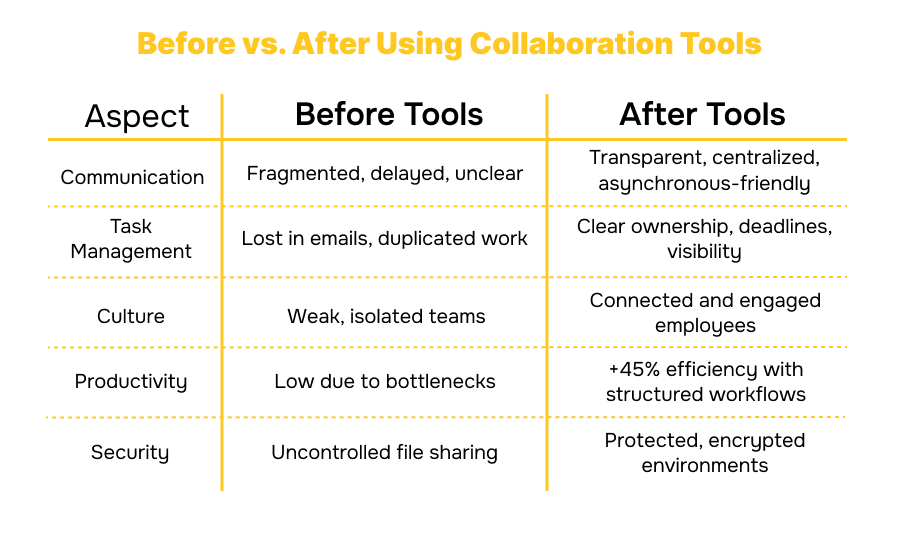
How Collaboration Looks: Before vs. After the Right Tools
Many organizations underestimate the transformation that structured digital collaboration can bring. Below is a simple comparison of remote work before and after implementing the right tool stack:
Abyron’s Expertise: How We Help Teams Build Strong Remote Collaboration Systems
Over the last decade, our team has helped startups, scale-ups, and enterprises implement collaboration ecosystems using both outsourcing and outstaffing service models. If you’re still choosing between them, we recommend reading our expert materials:
- Outsourcing vs. Outstaffing: How to Choose the Right Model to Reduce Software Development Costs
- 7 Reasons Outstaffing Is a Game-Changer for Startups & Scale-Ups
- Adapting products for the US market — insights from our experience
Our approach is simple: We blend top engineering talent with optimized collaboration processes to help clients achieve transparency, predictable delivery, and strong communication across remote teams.
If you want to build a high-performing distributed environment or scale your engineering capacity — our experts can guide you from tool selection to full implementation and ongoing support.
You can contact us directly through our website form.
Final Thought: Your Tools Shape Your Team's Future
Remote work isn’t about location — it’s about connection, structure, and clarity. With the right collaboration ecosystem, companies can unlock higher productivity, stronger culture, faster delivery cycles, and the freedom to hire globally.
Abyron helps businesses not only choose the right tools, but also build processes around them — from implementing asynchronous workflows to scaling distributed engineering teams through outsourcing and outstaffing.
If you're ready to build a remote team that works as smoothly as an in-office environment, we’re here to help. 👉 Reach out through our contact form.
Your team’s next level of performance starts with the right digital foundation — and we know exactly how to create it.
Frequently Asked Questions (FAQ)
Q1: How to keep remote teams connected? A: The key is building a communication ecosystem instead of relying on spontaneous interactions. Use a combination of synchronous communication tools (like Zoom or Google Meet), asynchronous collaboration tools (Notion, Slack, Loom), and dedicated informal digital spaces. Encrypted platforms like Slack Enterprise Grid also boost psychological safety, making employees more willing to participate and contribute.
Q2: What are online collaboration tools, and why do they matter? A: Online collaboration tools are digital platforms that help distributed teams communicate, share files, manage tasks, and collaborate in real time or asynchronously. They are essential because remote teams rely entirely on digital processes — without them, productivity, alignment, and engagement drop dramatically. These tools enable virtual collaboration in the workplace and seamless global teamwork.
Q3. How can you use collaboration tools to improve team communication? A: You can centralize messages, tasks, documents, and updates in one place. This reduces email overload, eliminates misunderstandings, and creates transparency. The best internal communication tools integrate chat, video, file sharing, and automation. Platforms like Asana or Monday.com also visualize workflows, making it easier for team members to understand priorities and progress.
Q4. What is asynchronous collaboration? A: Asynchronous collaboration is when team members work together at different times rather than simultaneously. It’s crucial for distributed teams in different time zones. Tools like Notion, Loom, and ClickUp make asynchronous collaboration smooth by allowing comments, recorded instructions, documented decisions, and transparent task ownership — reducing the need for constant meetings.


CONTACT US